Creating Alerts — Never Miss a Trade
Price alerts, indicator alerts, webhooks, and the complete alert automation system.
Staring at charts all day is psychologically draining and leads to forced trades. TradingView's cloud-based alert system — with 13 built-in conditions and 5 notification channels — transforms you from a chart-starer into a systematic, rules-based trader.
Because alerts run on TradingView's servers (not your computer), they fire even when your laptop is closed, your browser is off, or you're sleeping.
The Alert Engine — By the Numbers
TradingView's alert system is one of the most powerful in the industry, scaling from 3 basic alerts on the free plan to 1,000+ never-expiring alerts on Ultimate.
Shortcut
Alt+A
Official resources
Types of Alert Conditions
TradingView offers 13 built-in alert conditions, each designed for specific monitoring needs.
Price Alerts: Trigger when price crosses above/below a level, enters/exits a channel, or moves by a percentage.
Indicator Alerts: Fire when a technical indicator meets a condition — RSI crossing 70, MACD showing a bullish crossover, Supertrend flipping direction.
Drawing Alerts: Create alerts directly on trendlines, channels, horizontal support/resistance levels, and Fibonacci retracements.
Key takeaways
- Alert Source: Price levels
- Alert Source: Drawing objects
- Alert Source: Indicator values
- Alert Source: Pine Script strategies
- Alert Source: Watchlists
Notification Channels
When your alert condition is met, TradingView delivers the notification through multiple channels — you choose which ones to activate.
Browser Popup
- Instant on-screen notification
- Sound alert with customizable tones
- Available on all plans
Email & Mobile Push
- Detailed alert emails to any address
- Push notifications to iOS/Android app
- Fire even when browser is closed
Webhook (Plus+)
- Send JSON data to external APIs
- Connect to trading bots and automation
- Power algorithmic trading systems
Setting Up Your First Alert
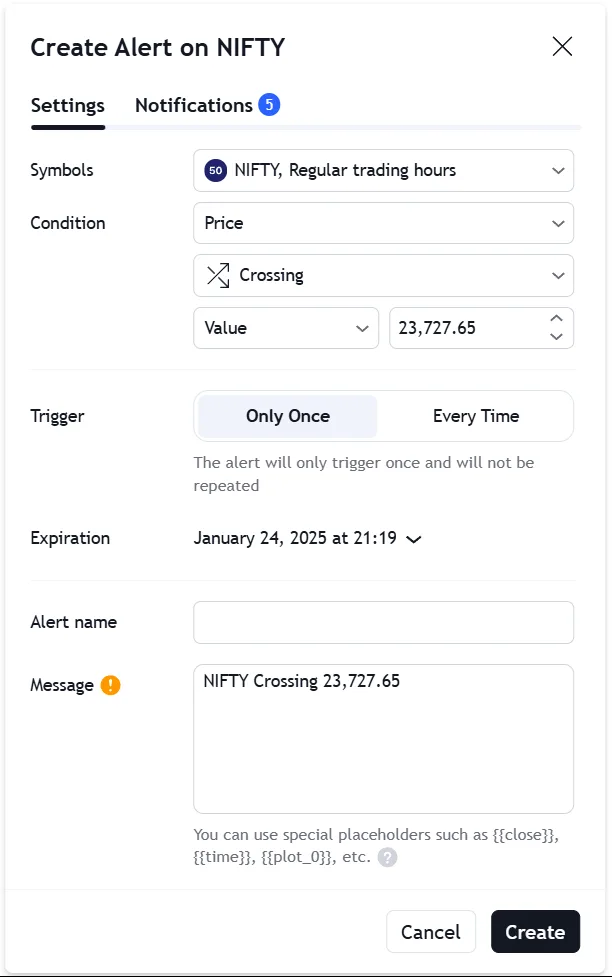
Right-click on any price level, trendline, or indicator on your chart and select 'Add Alert'. Configure the condition, choose your notification channels, and set an optional expiration.
Combine up to 5 settings — price, drawings, indicators, chart values, and custom logic — combining price, drawings, indicators, and custom Pine Script logic into a single alert on paid plans.
Use the shortcut (Alt + A) or (Option + A) to instantly set a price alert at your cursor's current location.
Key takeaways
- Set conditions based on raw asset prices, trendline crosses, or indicator values.
- Attach complex, multi-variable logic to a single notification event.
- Configure webhook endpoints to connect triggers directly to algorithmic trading bots.
Professional tip
A breakout trader can draw a descending trendline on an hourly chart. Instead of waiting hours for a potential break, right-click the trendline, select 'Add Alert', set notification to 'Crossing', and close the laptop. TradingView will wake you up.
Alert Limits by Plan
Understanding alert limits is crucial for choosing the right plan for your trading style.
| Features | TradingView | Traditional Brokers |
|---|---|---|
| Price Alerts | Free: 3 → Ultimate: 1000 | 5-20 max |
| Technical Alerts | Free: 0 → Ultimate: 1000 | Not available |
| Watchlist Alerts | Free: 0 → Ultimate: 15 | Not available |
| Alert Duration | Free: — → Ultimate: Never expires | 1 week max |
| Multi-Condition | Essential+ (up to 5 conditions) | Not available |
| Webhook | Plus+ plans | Not available |
Critical warning
Free accounts are limited to 3 price alerts with no technical or watchlist alerts. Serious traders automating systems will need at least the Essential tier.
Unlock TradingView Pro
More charts per layout, custom timeframes and more indicators per chart.
Common questions
TradingView alerts are server-side — they run on TradingView's cloud servers 24/7, even when your computer is off. You set a condition (price crosses a level, indicator triggers, trendline breaks), and TradingView sends you a notification via app push notification, email, SMS, webhook, or in-app popup. Alerts support 13 condition types and can be triggered by any indicator, including custom Pine Script indicators.
Official TradingView resources
- Help CenterHow do I enable push notifications to receive alerts on my iOS device?Here are the steps that you need to follow.Download the latest version of the app on the AppStore.Log into your TradingView account.Allow the app to s...
- Help CenterHow do I enable push notifications to receive alerts on my Android device?Here is what you need to do to start receiving push notifications through your Android app:Download the latest version of the app on Google Play Store...
- Help CenterAndroid: I'm not receiving notifications about triggered alertsPlease complete the following steps if you are unable to receive notifications on your Android app. Make sure that you created an alert in the correct...
- Help CenteriOS: I'm not receiving notifications about triggered alertsPlease complete the following steps if you are unable to receive notifications on your iOS app. Make sure that you created an alert in the correct way...
Keep reading
- Module undefinedIndicators, Metrics & StrategiesYour complete technical analysis toolkit — from moving averages to Pine Script.
- Module undefinedBar Replay & BacktestingPractice trading with historical data in a risk-free simulation environment.
- Module undefinedTrading, Alerts & Events SettingsConfiguring your trading interface, alert notifications, and event tracking.

Written By
Rohit Singh
Mr. Chartist
With 14+ years of experience in Indian financial markets, Rohit Singh (Mr. Chartist) is a SEBI Registered Research Analyst, Amazon #1 bestselling author, and the founder of Investology — a premium trading ecosystem trusted by a 1.5 Lakh+ strong community across India.
TradingView is a registered trademark of TradingView, Inc. All screenshots, logos and platform imagery are the property of TradingView, Inc. and are used here for educational purposes only under fair use. This content is not affiliated with, endorsed or sponsored by TradingView. (c) 2026 TradingView, Inc. All rights reserved. www.tradingview.com