Chart Types — Complete Guide
From candlesticks to Heikin Ashi — choosing the right visualization for every analysis.
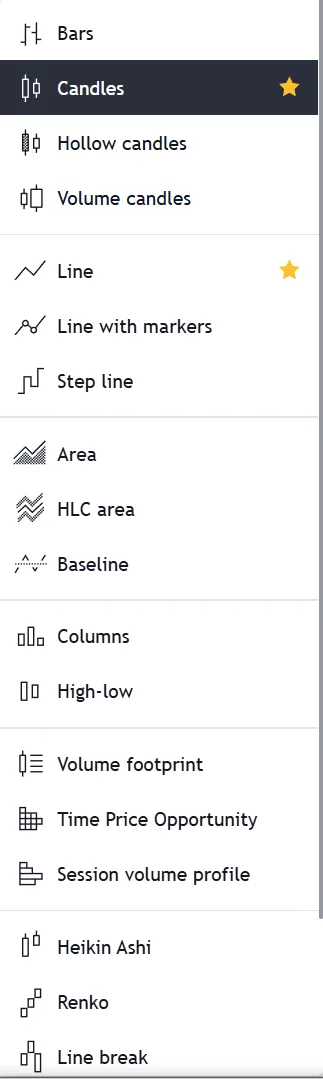
TradingView offers an industry-leading arsenal of 21 distinct chart types. While 17 of these are available entirely for free, advanced institutional order-flow charts like Volume Footprint and TPO are reserved for Premium and Expert users.
A chart is not just a picture of price; it is a lens. Choosing the right visualization determines what information is amplified and what market noise is filtered out. In this guide, we break down the four major categories of TradingView charts—Standard, Line, Japanese, and Order Flow—and explain exactly when professional traders use each.
1. The 21 Chart Types Universe
A chart type is nothing more than a decision about how to draw the same numbers. The trades that happened on NSE:RELIANCE between 09:15 and 15:30 IST are a fixed historical fact; a candlestick chart, a line chart and a Renko chart are three different ways of drawing that one fact. None of them adds information and none of them is more 'true' than the others. What they change is which parts of the record are emphasised and which are thrown away — and since throwing the right things away is most of what analysis is, the choice matters more than beginners expect.
TradingView's 21 chart types divide into two families. **Time-based charts** print a new candle or bar every fixed interval, whether or not anything happened. On a 15-minute chart of NSE:TCS you get a new candle at 09:30, 09:45 and 10:00 regardless of whether the stock moved ₹40 or ₹0.40 in between. Candlesticks, Bars, Line, Area, Baseline and Heikin Ashi all work this way. **Price-based charts** ignore the clock entirely and print only when price travels a set distance. Renko, Point & Figure, Kagi, Line Break and Range bars belong here. A quiet hour on such a chart produces literally nothing, which is either exactly what you want or a serious loss of context, depending on what you are looking for.
There is a third axis worth naming: how much of each period the chart shows you. A Line chart keeps only the closing price and discards the open, the high and the low. A candlestick keeps all four — Open, High, Low and Close, usually abbreviated OHLC. A Volume Footprint chart keeps considerably more than four, breaking a single candle open to show how much traded at each individual price inside it. Moving up that ladder gives you more detail and more to misread; moving down gives you clarity and blind spots. Experienced chartists move deliberately between levels rather than settling permanently on one.
For most Indian retail traders the honest answer is that candlesticks on NSE cash and F&O charts will carry you a very long way, and that the exotic types are worth understanding mainly so you know what you are choosing not to use. The sections below work through each family: the standard OHLC types, the closing-price types, the noise-filtering Japanese and price-based types (including Renko and Range bars), and finally the order-flow types like Volume Footprint that require both a Premium plan and real-time exchange data.
Key takeaways
- Every chart type draws the same underlying trades — the type decides what is emphasised and what is discarded.
- Time-based charts (candles, bars, line) print on a clock; price-based charts (Renko, Range, P&F) print on movement.
- OHLC means Open, High, Low, Close — the four prices a candlestick encodes and a line chart throws away.
- 17 of the 21 types are free; the four order-flow types need Premium or above plus real-time exchange data.
- A price-based chart shows nothing at all during a quiet hour — that is the feature, and also the risk.
- Candlesticks on NSE equities and F&O cover the large majority of real analytical work.
Shortcut
Alt+H
2. The Foundation: Candlesticks & Bars
Japanese Candlesticks are the undisputed global standard for modern trading. They pack the maximum amount of information—Open, High, Low, and Close (OHLC)—into an intuitively readable format that immediately conveys the session's battle between buyers and sellers.
Hollow Candles offer a slight variation: they use solid vs. hollow bodies to differentiate between sessions where the close was higher than the open, versus sessions where the close was higher than the previous day's close. This nuanced difference helps traders identify weak rallies.
Traditional Bars contain the exact same OHLC data as candlesticks but emphasize the closing price (the right tick) over the body. Institutional traders often prefer Bars because they strip away the emotional bias created by large colored candlestick bodies.
Japanese Candlesticks
- Industry standard for modern technical analysis.
- Essential for reading price action patterns (Doji, Engulfing).
- Clearly shows the 'wicks' representing price rejection.
Hollow Candles
- Differentiates absolute vs relative closing strength.
- Solid green = closed higher than open, but lower than yesterday.
- Hollow green = closed higher than open AND yesterday.
Traditional Bars
- Left tick = Open; Right tick = Close.
- Removes the visual 'weight' of large candlestick bodies.
- Preferred by classical chartists (e.g., Wyckoff practitioners).
For 95% of active day trading in the Indian Equities and F&O markets, standard Japanese Candlesticks should remain your primary chart type.
3. Macro Trends: Line, Area & Baseline
When analyzing massive historic trends on a Weekly or Monthly timeframe, Candlesticks can actually provide too much information, causing 'analysis paralysis' from intraday volatility wicks.
Line and Area charts solve this by plotting only the closing prices. Because closing prices are the most important data point of the day (representing the final consensus of market participants), Line charts offer the purest visualization of the underlying macro trend.
Baseline charts take this a step further by allowing you to define a specific anchor price (e.g., the pre-COVID high). The chart will color the area green when trading above the baseline, and red when trading below it, providing instant visual context of relative performance.
Key takeaways
- Line Chart: Best for drawing clean, long-term macro trendlines by connecting closing prices.
- Area Chart: Visually identical to a Line chart but shaded below, ideal for presentation and comparing multiple assets.
- HLC Area: Disregards the open price entirely, focusing only on High, Low, and Close.
- Step Line: Connects prices using 90-degree horizontal and vertical steps, highlighting the exact moment a price level changed.
Professional tip
Switch to a Line chart when you are struggling to find clean Support & Resistance zones. Candlestick wicks often obscure clean structural levels that are obvious on a Line chart.
4. Noise Reduction: Japanese & Price-Based Charts
This category contains advanced chart types designed specifically to filter out 'market noise'—meaningless sideways chop that triggers false breakouts.
Heikin Ashi (Japanese for 'average bar') modifies traditional candlesticks by averaging the current and prior session's data. The result is a profoundly smooth chart where strong uptrends are painted as a continuous series of green candles with no lower wicks, making it incredibly easy to ride a trend without getting shaken out.
Renko, Kagi, and Point & Figure charts go a step further: they completely eliminate Time from the X-axis. A new Renko 'brick' is only drawn when the price moves a predefined amount (e.g., 10 points). If the price chops sideways for 5 hours within a 9-point range, the Renko chart will not draw anything, effectively deleting the chop from your screen.
Heikin Ashi (Averaged)
- Time-based, but mathematically smoothed.
- Excellent for trend-following and swing trading.
- WARNING: Do not use for precise entry/exit levels.
Renko (Bricks)
- Purely price-based. Ignores time entirely.
- New brick forms only when a fixed point threshold is met.
- Completely eliminates sideways consolidation noise.
5. Institutional Grade: Volume Footprint & TPO
The highest echelon of TradingView chart types is reserved for Premium and Expert users. These charts integrate Order Flow and Volume Distribution directly into the price structure, revealing the 'why' behind the price movement.
A Volume Footprint chart physically cracks open a candlestick to show you exactly how many contracts were bought at the Ask (aggressive buyers) vs sold at the Bid (aggressive sellers) at every single price tick inside that candle. This allows scalpers to spot 'imbalances' and trapped traders in real-time.
Time Price Opportunity (TPO), also known as Market Profile, generates a statistical bell curve of where price spent the most time during a session. It highlights the Point of Control (POC) and Value Areas—critical zones where institutional players are accumulating or distributing inventory.
| Features | TradingView | Traditional Brokers |
|---|---|---|
| Volume Footprint | Premium / Expert | Shows Bid/Ask delta inside the candle |
| TPO (Market Profile) | Premium / Expert | Shows time distribution across price levels |
| Session Volume Profile | Premium / Expert | Shows volume distribution histogram per session |
Critical warning
Volume Footprint, TPO, and Session Volume Profile charts require a Premium or Expert plan.
Critical warning
Order flow charts require Real-Time tick data to function accurately. Ensure you have purchased the relevant NSE/BSE data feeds if trading Indian markets.
6. Workflow Optimization: Starring Favorites
Just like timeframes, you don't need to constantly open the Chart Type dropdown menu. You can pin your most frequently used chart types directly to your top toolbar for one-click access.
Simply open the Chart Type selector, hover over your preferred styles (e.g., Candles, Line, Heikin Ashi), and click the Star (★) icon next to them.
The ultimate workflow: Use Candlesticks for entry triggers, Line charts for macro support/resistance, and Heikin Ashi for managing active swing trades.
Unlock TradingView Pro
More charts per layout, custom timeframes and more indicators per chart.
Common questions
TradingView supports 21 distinct chart types. This includes 17 free standard types (Candlesticks, Line, Heikin Ashi, Renko, etc.) and 4 advanced order-flow types (Volume Footprint, TPO, Session Volume Profile, Volume Candles) reserved for Premium and Expert plans.
Official TradingView resources
- Help CenterStrategy produces unrealistic results on non-standard chart types (Heikin Ashi, Renko, etc.)On TradingView, strategies can be applied to any type of chart, including non-standard ones like Heikin Ashi (HA), Renko, Kagi, Point and Figure and R...
- Help CenterThe color of bars or candlesticks is incorrectYou may have applied an indicator that paints the bars on the chart. Try hiding indicators on the chart to see if that's the case.If some bars are aut...
- Help CenterThe Renko chart is not displayed or is displayed incorrectlyFor the Renko chart to display correctly, it is important to select the appropriate box size. If the Renko chart is not displayed, most likely you hav...
- Help CenterThe Renko chart shows incorrect values and/or is constantly being recalculatedHow are Renko bricks calculated?On historical bars:TradingView and data suppliers cannot make available the complete historical tick data required to ...
Keep reading
- Module undefinedSymbol Search & TimeframesFinding any asset instantly and mastering multi-timeframe analysis.
- Module undefinedIndicators, Metrics & StrategiesYour complete technical analysis toolkit — from moving averages to Pine Script.
- Module undefinedCompare Feature & Overlay AnalysisRelative strength, correlation analysis, and pairs trading using the Compare tool.
- Module undefinedTop Menu & Account BasicsNavigating the control panel — profile settings, home, help center, and dark mode.

Written By
Rohit Singh
Mr. Chartist
With 14+ years of experience in Indian financial markets, Rohit Singh (Mr. Chartist) is a SEBI Registered Research Analyst, Amazon #1 bestselling author, and the founder of Investology — a premium trading ecosystem trusted by a 1.5 Lakh+ strong community across India.
TradingView is a registered trademark of TradingView, Inc. All screenshots, logos and platform imagery are the property of TradingView, Inc. and are used here for educational purposes only under fair use. This content is not affiliated with, endorsed or sponsored by TradingView. (c) 2026 TradingView, Inc. All rights reserved. www.tradingview.com