Why Choose TradingView?
Six compelling advantages that make TradingView the preferred platform for traders worldwide.
With 100M+ registered users across 180+ countries, TradingView has become the default charting surface for Indian retail traders. "Everyone uses it" is not a reason to use it yourself, though — so this article takes the six things the platform is actually built around and explains the mechanism behind each one.
The six are: where the market data comes from and what you are entitled to see; how the charting engine handles drawing and history; what sits around the chart (screeners, alerts, financials, scripting); how a workspace stored in the cloud changes the way you work; what a simulator does and does not teach; and how wide the instrument coverage actually is for someone trading NSE, BSE and MCX.
Everything here is descriptive. It is not advice, it does not tell you which plan to buy, and it makes no claim about what any tool will do for your results.
TradingView by the Numbers — And What They Mean
Platform statistics are usually decoration. These ones are worth a moment because each of them maps onto something you either can or cannot do on a given afternoon. The instrument count decides whether the mid-cap you heard about is chartable at all. The study and drawing-tool counts decide whether your method has to bend to fit the software. The historical-bar limit decides how far back you can scroll before the chart runs out — which matters directly when you are trying to see how NSE:HDFCBANK behaved through the last two full corrections rather than only the last six months.
The number that most beginners misread is the user count. A hundred million registered accounts does not mean a hundred million active traders, and it certainly does not mean the crowd is right. What it does mean, practically, is depth of supporting material: if you are trying to work out how a particular drawing tool behaves on a weekly BANKNIFTY chart, somebody has already written it up, published a script for it, or answered it in a comment thread. Large platforms accumulate documentation the way small ones cannot.
The counts also come with a limit you should read before you read anything else: nearly every number here is plan-dependent. Charts per tab, studies per chart, alert count, history depth and data entitlement all step up as you move from the free tier through Essential, Plus, Premium and Ultimate. A feature existing on the platform is not the same as that feature existing in your account, and the pricing article covers the exact tier boundaries.
Read every platform statistic as a question about your own account: does this number apply to the plan you are actually logged into?
Key takeaways
- Instrument count decides whether a given NSE or BSE listing is chartable at all
- Historical-bar limits decide how far back you can scroll — the free tier is capped at a few thousand bars
- Study and drawing-tool counts decide whether your method fits the software or has to be adapted
- A large user base mostly buys you documentation and worked examples, not correctness
- Almost every headline number is plan-dependent — the feature list and your account's feature list are different things
Critical warning
Free-tier accounts commonly see delayed feeds. Real-time NSE and BSE prices depend on both your subscription tier and the exchange data entitlement attached to your account — the two are billed and granted separately. Check what your own account is entitled to before treating an on-screen quote as live.
Market Data — What You Get, and What You Are Entitled To
TradingView carries roughly 3,539,722 instruments drawn from 70+ stock exchanges and 70+ crypto venues, with professional data vendors including ICE Data Services and FactSet behind the aggregate feed. That is the supply side. The part that trips up Indian users is the demand side: what any individual account is permitted to see in real time.
Exchange data is licensed, not free. NSE and BSE, like every major exchange, treat their live price feed as a product and distribute it under agreements that specify who may receive it and on what terms. On TradingView this shows up as a data entitlement attached to your account, billed and granted separately from your subscription plan. Hold the entitlement and quotes stream live. Hold none and the platform still charts the instrument perfectly well — you simply see it on a delay, which is standard practice across the industry and not a defect.
The practical consequence is worth being blunt about. If your method depends on acting inside the 09:15 to 15:30 IST session — reacting to a breakout on a five-minute BANKNIFTY chart, or working an options position around a level on NSE:RELIANCE — you need to verify your entitlement before you rely on the number on screen. If your method is end-of-day, where you review daily candles after the close and place orders the next morning, delayed intraday data changes nothing about your workflow, because daily closes are the same for everyone once the session is over.
Beyond price, the same data layer supplies quarterly financials for listed companies, an economic calendar covering scheduled Indian releases such as RBI policy decisions and inflation prints, and news mapped to the symbol you are charting. This is the part that removes tab-switching: the result date, the release calendar and the price chart are on one screen and on one time axis.
Data source
Delayed data Free | Real-time data Non-professional fees, per month | Real-time data Professional fees, per month | |
|---|---|---|---|
| 15 min | ₹0 | ₹0 | |
| 15 min | ₹422 | ₹2870 | |
| 15 min | ₹176 | ₹176 | |
Metropolitan Stock Exchange MSE · India 🇮🇳 FUTURES | N/A | ₹0 | N/A |
| N/A | ₹0 | ₹0 | |
National Commodity & Derivatives Ex NCDEX · India 🇮🇳 FUTURESINDICES | N/A | ₹0 | N/A |
Key takeaways
- Real-time NSE and BSE quotes depend on an exchange data entitlement as well as on your subscription tier
- Without an entitlement the chart still works — the feed is simply delayed, which is normal industry practice
- End-of-day and swing workflows are largely unaffected by delayed intraday data; intraday workflows are not
- Aggregate data is sourced through professional vendors including ICE Data Services and FactSet
- The same layer carries company financials, an economic calendar and symbol-mapped news
- Verify entitlement on the platform's market-data page rather than inferring it from the plan name
Professional tip
Before assuming a quote is live, open the symbol's status line and look at the data label next to the exchange name. TradingView marks whether the feed you are receiving for that instrument is real-time or delayed, and it does so per symbol — so an MCX contract and an NSE cash stock in the same watchlist can be on different footings.
The Charting Engine — Why Drawing Precision Matters
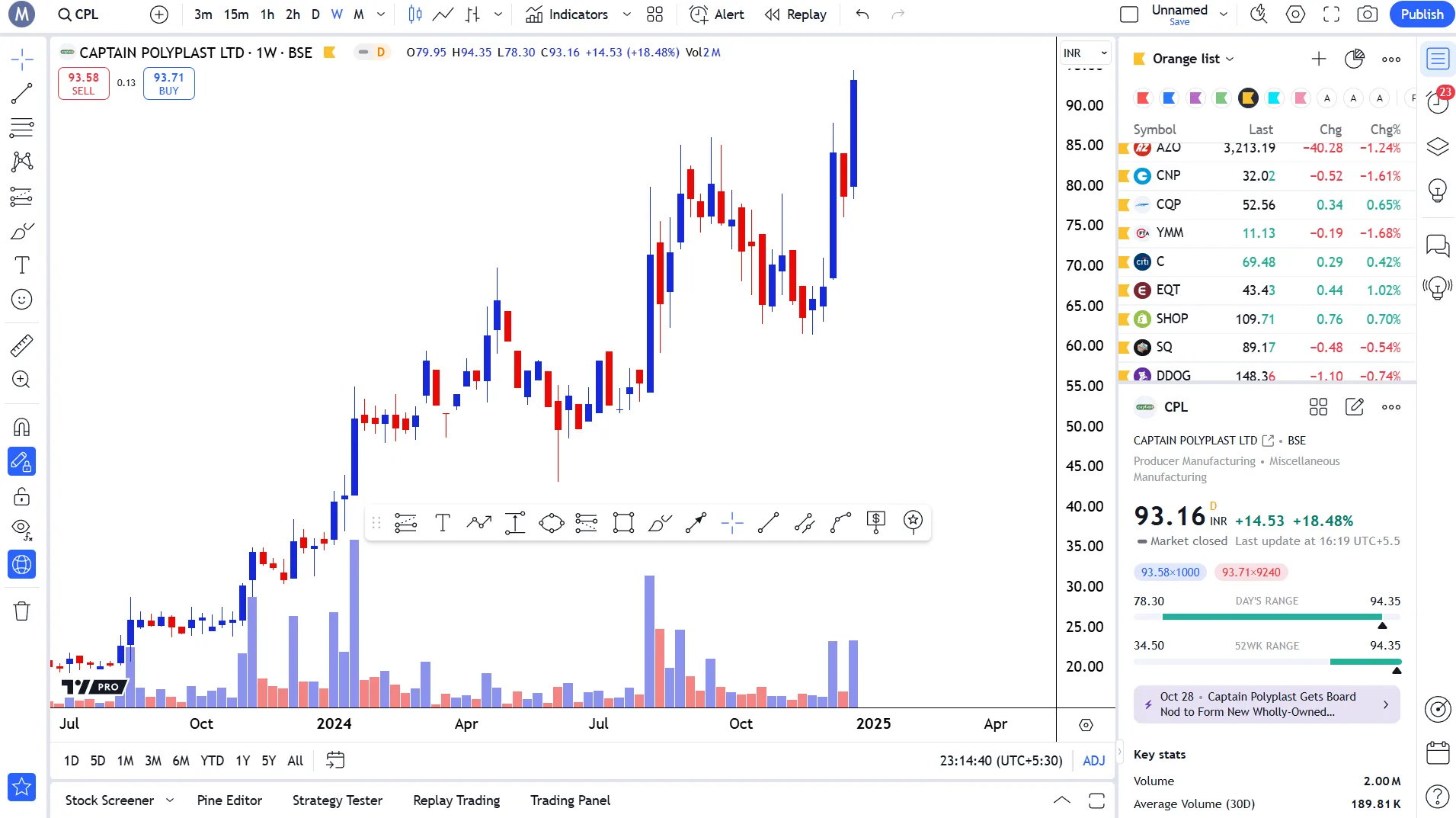
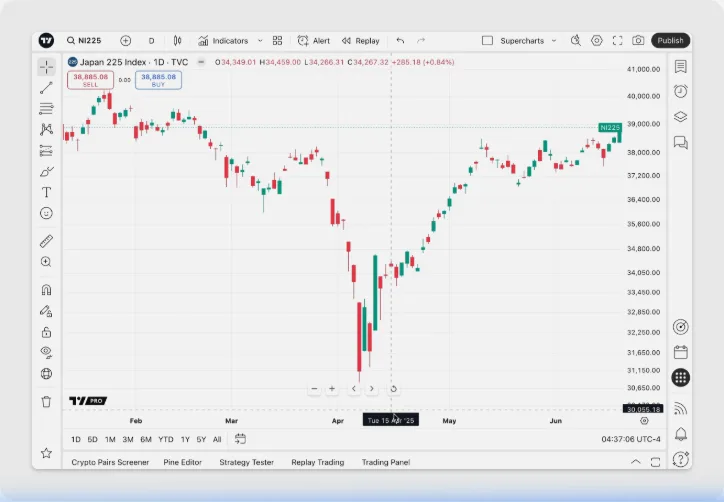
Supercharts supports 21 chart types, 110+ drawing tools and 400+ built-in studies, with roughly 100,000+ more published by users. The counts are the least interesting part. What separates a serious charting engine from a basic one is whether a level you draw is exactly where you meant it to be, and whether the chart stays responsive when you ask it to show you years of history at once.
Precision comes from magnet mode. With it on, every anchor point you place snaps to the actual high, low, open or close of the nearest candle instead of to wherever your cursor happened to be. On a stock trading near ₹1,600 the difference between a resistance line at ₹1,632.40 and one at ₹1,634 is the difference between a level that price respected three times and a line that merely looks close. For anyone marking support and resistance by hand — which is most price-action work — this single setting does more for the quality of your charts than any study.
Responsiveness comes from how the engine loads and redraws data. It is written in HTML5 and renders to a hardware-accelerated canvas, which means panning back across a decade of NSE:TCS daily candles is a smooth scroll rather than a series of loading pauses. This matters more than it sounds. Analysis that requires you to wait gets skipped; analysis that costs a flick of the wrist gets done. Being able to zoom out to a monthly chart, see the whole base-building period, and zoom back to a daily view without losing your drawings is a workflow feature disguised as a performance one.
The third piece is that the chart type itself is a variable rather than a fixed setting. Candles are the default, but Heikin Ashi (candles built from averaged values, which smooths a trend), Renko (fixed-size bricks that ignore elapsed time entirely) and Volume Profile overlays (which group traded volume by price level instead of by time) each answer a different question about the same data. Being able to switch between them on one instrument, without rebuilding anything, is how you check whether a structure you think you see survives a change of lens.
Key takeaways
- Magnet mode snaps drawings to exact candle extremes — the difference between a real level and an approximate one
- Hardware-accelerated rendering keeps a decade of daily candles scrollable without loading pauses
- Drawings persist across timeframe changes, so a weekly level stays visible on the five-minute chart
- Chart type is a lens you can switch: Heikin Ashi smooths, Renko removes time, Volume Profile re-sorts volume by price
- Layouts save the full arrangement — instrument, timeframe, drawings and studies — and reload intact
- Studies are optional. Price, volume and candle behaviour on a clean chart remain a complete method
Professional tip
Turn on strong magnet mode before you draw anything (the magnet icon on the left toolbar, or Ctrl+click while dragging). Nearly every complaint about levels not working traces back to anchors placed two or three ticks away from the candle extreme they were supposed to be on.
What Sits Around the Chart
A chart shows you one instrument. Everything else on the platform exists to solve the problem of the other five thousand. The screener is the first of these: a filter that runs across an entire exchange in one pass, letting you state conditions — listed on NSE, average traded volume above a floor, price within a few percent of its 52-week high, currently above its 200-day average — and returning the short list that satisfies all of them. You then chart those by hand. Without a screener, discretionary chart reading does not scale past the handful of names you already know.
Alerts are the second, and the mechanism is what makes them valuable. TradingView evaluates alert conditions on its own servers, not inside your browser tab. Set an alert on a trendline break on NSE:INFY and the condition keeps being checked when your laptop is shut, when your phone is in your pocket, and while you are at work through the middle of the session. Delivery is by app push, email, or webhook — an automatic message posted to another web address, which is how a trader connects an alert to their own tooling. For anyone who cannot sit in front of a screen from 09:15 to 15:30 IST, this converts the platform from something you watch into something that notifies you.
The third group is analytical context. Quarterly income-statement, balance-sheet and cash-flow figures can be plotted underneath the price chart on the same time axis, so a result date and the price reaction to it line up visually. An economic calendar tracks scheduled releases. A news pane maps headlines to the symbol you are charting. None of this is exotic, but having it inside the same tab removes the tab-switching that quietly eats an evening's analysis.
The fourth is Pine Script, a small language built for exactly one purpose: expressing chart logic. It is not general-purpose software development, and it is deliberately narrow. If your idea is highlight every candle that closes above the highest high of the previous twenty candles, that is a handful of lines. About a hundred thousand published scripts already exist with their source visible, so reading and adapting is the normal path in.
Real-Time Market Data
- 3.5M+ instruments across all asset classes
- Institutional-grade data from ICE, FactSet, Quartr
- NSE, BSE, MCX data for Indian traders
21 Chart Types & 110+ Drawing Tools
- From Candlesticks to Volume Footprint
- Fibonacci, Elliott Wave, Gann tools
- Auto pattern recognition & chart patterns
100% Cloud-Based
- Zero downloads — runs in your browser
- Instant sync across desktop, mobile, tablet
- Your drawings, layouts, and alerts travel everywhere
100M+ Global Community
- Share and discover trading ideas
- 100,000+ free public indicators
- Pine Wizards, Freelancers & Paid Spaces
Risk-Free Paper Trading
- Practice with virtual money on realistic simulation
- All asset classes in one account
- Custom leverage, commissions, and balance
Pine Script® v6 Programming
- Build custom indicators and strategies
- Full cloud IDE with debugger and profiler
- 150,000+ published scripts to learn from
Global Data Coverage
- 130K+ stocks across 100+ exchanges
- 800+ forex pairs
- 2500+ crypto assets
- Full NSE, BSE, MCX coverage
The chart answers a question about one instrument. The screener, the alerts and the calendar are what stop the other five thousand from going unwatched.
Key takeaways
- The screener is what makes discretionary charting scale beyond the names you already follow
- Alerts are evaluated server-side, so a level is watched while your machine is off
- Webhook delivery lets an alert trigger something outside TradingView entirely
- Financial statements plot on the price chart's own time axis, lining up results with price reaction
- The economic calendar carries scheduled Indian releases including RBI policy dates
- Pine Script is narrow by design — chart logic only, with ~100,000 readable published examples
A Workspace That Is Not Tied to a Machine
Everything you create on TradingView is stored against your account on its servers: chart layouts, every drawing on them, watchlists, alert definitions, colour themes and tool preferences. There is no save-to-disk step, no export, and no backup file to lose. The consequence is that the machine you happen to be sitting at stops mattering. Log in from a different computer and the same workspace loads, with the trendline you drew twenty minutes earlier already on the chart.
For an Indian trader the value of this is mostly about the shape of the day. Analysis usually happens outside market hours — evenings and weekends, at a desk, with time to scroll history and mark levels properly. The market, however, moves between 09:15 and 15:30 IST, when most people are somewhere else. Cloud sync is what joins those two halves: the levels you marked on Sunday are on the phone chart on Tuesday, and an alert set from the desktop reaches you wherever you are logged in. Without it you would be maintaining two separate sets of charts and trusting your memory to reconcile them.
It also removes a category of loss that used to be normal. On installed charting software, a failed drive or a reformatted machine took your saved chart work with it, and rebuilding years of marked levels was not realistic. Server-side storage makes replacing a laptop a non-event. The trade-off is honest and worth naming: your work lives on someone else's infrastructure, and access depends on your account and an internet connection. For most retail workflows that is a good trade, but it is a trade.
Sync is bidirectional and near-immediate rather than a scheduled backup. A drawing made on the phone during a commute is on the desktop when you sit down. An alert created at the desktop fires to the phone. The platform does not ask which device is authoritative, because none of them is — the account is.
Web Browser
- Works on Chrome, Safari, Edge, Firefox
- Zero installation — cloud-based
- Full feature parity with desktop
Desktop App
- Windows, macOS, Linux support
- Native multi-monitor & tab linking
- Lower RAM, faster Pine Script execution
Mobile Apps
- iOS and Android — full charting engine
- Push notifications for alerts
- Draw, analyze, and trade on the go
Key takeaways
- Layouts, drawings, watchlists, alerts and themes are stored against the account, not the device
- Sync is bidirectional and near-immediate — there is no save, export or backup step
- This is what joins evening analysis to a market that trades while you are elsewhere
- Replacing a machine no longer costs you saved chart work
- The trade-off: your work sits on TradingView's infrastructure and needs an account plus a connection
- Simultaneous device connections are capped per plan, from two on the free tier upward
Professional tip
Name your layouts rather than leaving them as Unnamed. A trader running separate arrangements for index charts, cash-market swing candidates and an F&O expiry-day screen will find those three loading far faster from a named list than from a stack of identical-looking defaults.
Paper Trading — What a Simulator Does and Does Not Teach
TradingView includes a paper-trading account: a simulated broker connection with a virtual balance, where orders are placed against live market prices without any real money moving. It is available on every plan, requires no broker connection and no capital, and can be reset back to its starting balance whenever you want. Orders can be placed from the trading panel or dragged directly on the chart, which is the same physical workflow you would use with a connected broker.
What a simulator genuinely teaches is mechanics, and mechanics are where beginners lose money for reasons that have nothing to do with analysis. How a market order differs from a limit order. What a stop-loss order actually does when it triggers. How position size relates to the distance between entry and stop. Where the buttons are, and what happens if you press the wrong one at 09:20 IST when NIFTY has gapped. Learning all of that with virtual money is straightforwardly cheaper than learning it with real money, and there is no argument against doing it first.
What a simulator cannot teach is how you behave when the money is yours. A simulated position moving against you produces none of the physical response a real one does, and traders routinely hold simulated losers with a calm they cannot reproduce a week later. Fills are also idealised: real orders face queue position, partial fills, and slippage in fast markets, none of which a simulator reproduces faithfully. Treat simulated results as evidence that you understand the software, not as evidence about anything else.
There is a second, quieter use: the simulator pairs well with Bar Replay. Replay hides the future candles on a historical chart and steps forward one bar at a time, so you can walk through a past NIFTY 50 session making decisions without knowing the outcome. Doing this with the simulator attached forces you to actually place the order rather than telling yourself afterwards what you would have done.
A simulator is a flight trainer for the software, not a rehearsal for your own psychology. Use it for the buttons, and be honest about the rest.
Key takeaways
- Available on every plan, needs no broker connection and no real capital, and resets on demand
- Best used to learn order mechanics — market versus limit, how a stop behaves, how size relates to stop distance
- It does not reproduce the pressure of real money, so behaviour under stress is not being tested
- Fills are idealised: queue position, partial fills and slippage in fast markets are not simulated
- Pairs well with Bar Replay, which hides future candles and forces decisions without hindsight
- Treat simulated outcomes as proof you can operate the platform, not as proof of anything else
Coverage — Indian Markets Alongside Everything Else
The platform indexes roughly 3,539,722 instruments across every major asset class. For an Indian trader the parts that matter are NSE and BSE cash-market listings, index and stock derivatives including NIFTY 50 and BANKNIFTY contracts, and MCX commodities such as gold, silver and crude oil. Symbols are written exchange-first — NSE:RELIANCE, NSE:TCS, NSE:HDFCBANK, NSE:INFY — which removes the ambiguity that arises when a company is listed on more than one exchange.
Breadth is not automatically a virtue. What it actually buys you is context. When BANKNIFTY has an unusual session, being able to pull up the dollar-rupee rate, the S&P 500 futures and gold on the same screen tells you whether you are looking at something specific to Indian banks or the local expression of a global move. That question is very hard to answer from a single-market platform, and answering it wrongly is how traders convince themselves a stock-specific story exists where there is only beta.
Coverage also extends past price. Company financials for Indian listings, an economic calendar carrying RBI policy dates and domestic inflation and GDP releases, sector heat maps and bond-yield views are all available from the same account. Again the point is not that any one of these is unique — it is that the switching cost between them is zero, so the check that takes four seconds actually gets done, where the one that takes four minutes does not.
One practical note on coverage: not every derivative contract and not every thinly traded BSE-only listing carries the same depth of history as a large-cap NSE name. Before building a routine around an instrument, scroll its chart back a few years and confirm the data is actually there.
Key takeaways
- NSE and BSE cash listings, index and stock derivatives, and MCX commodities are all charted from one account
- Exchange-prefixed symbols (NSE:RELIANCE, NSE:INFY) remove dual-listing ambiguity
- Global context — USD/INR, US indices, gold — helps separate a stock-specific move from a market-wide one
- Indian company financials, RBI policy dates and domestic macro releases sit in the same interface
- Sector heat maps and bond-yield views cover the top-down part of the workflow
- History depth varies by instrument — check a thin BSE listing before relying on its long-term chart
Compared With the Alternatives
Most Indian traders arrive at TradingView already owning charts, because every broker platform includes some. The comparison worth making is therefore not product versus product but capability versus need. Broker-bundled charting is close to the order window and usually free with the account; it tends to carry a smaller study library, a shorter drawing toolbar, no scripting, and no way to reopen the same saved layout on a different device. If your method is a few horizontal levels on a daily chart and you place orders as you look at them, that may be entirely sufficient, and there is no merit in paying for capability you will not use.
The second alternative is legacy installed terminals: powerful, still standard in some institutional settings, and built around a per-seat licence with a separately billed data feed. They are tied to a machine, they need someone to maintain them, and their pricing assumes a firm rather than an individual. The browser model removes the install and the machine dependency, and puts a genuinely usable free tier at the bottom of the ladder — which is the actual reason retail adoption went the way it did.
The third is data and screener websites, which are strong on fundamentals, ratios and tabular comparison but generally offer only a serviceable price chart. Traders commonly run one of these alongside TradingView rather than choosing between them, because the jobs barely overlap: one answers what does this company look like financially, the other answers what is price doing and where are the levels.
This article deliberately does not rank brokers against each other or tell you where to open an account — that is a distribution question, not an educational one. The comparison that matters is narrower and entirely yours: name the specific thing your current tool will not let you do, and check whether the thing you are considering does it.
| Features | TradingView | Traditional Brokers |
|---|---|---|
| Cloud-Based Access | Yes — any browser, any device | Desktop-only installation |
| Built-in Indicators | 400+ plus 100K+ community | ~50-100 built-in |
| Custom Scripting | Pine Script® v6 with cloud IDE | Limited or no scripting |
| Social Network | 100M+ users, Ideas, Scripts | No community features |
| Device Sync | Instant cloud sync everywhere | Manual backup required |
| Screeners | 7 types, 400+ filters, real-time | Basic stock screener only |
| Options Analytics | Full chain, Strategy Builder, Greeks | Separate platform needed |
| Price | Free tier available | $24,000/yr (Bloomberg) |
The combination is the unusual part: a precise drawing surface, alerts that run without you, a scripting language, and a workspace not tied to one machine.
Key takeaways
- Broker-bundled charts win on proximity to the order window and lose on depth, scripting and portability
- Installed terminals stay tied to a machine and a licence — precisely the costs the browser model removes
- Screener and data sites answer a different question and are usually run alongside, not instead
- Server-side alerts are the capability most often missing elsewhere and most missed once used
- Decide by naming the one job your current tool cannot do, not by counting features
Unlock TradingView Pro
More charts per layout, custom timeframes and more indicators per chart.
Common questions
Broker-bundled charting typically offers a smaller study library, a shorter drawing toolbar, no scripting, and no way to reopen a saved layout on another device. TradingView adds roughly 400 built-in studies, over 110 drawing tools, Pine Script, alerts evaluated on its servers rather than in your browser, and a workspace stored against your account. What broker charting has that TradingView does not is the order window sitting next to the chart, which is why many traders analyse in one place and execute in the other.
Official TradingView resources
- Help CenterMacro Maps on TradingView: explore, compare, trackUnderstanding global trends and the current market state is the foundation of financial analysis. Whatever asset you trade, knowledge of key economic ...
- Help CenterI am new to TradingView. Where can I learn more on how to use TradingView features and tools?Our Help Center will tell you everything you need to know about built-in indicators and strategies that are commonly used in our charts. Check out our...
- Help CenterChart trading on TradingView: key features and advantagesChart trading is a TradingView feature that consists of a functionality for managing orders and positions directly on Supercharts. This provides a mor...
- BlogCoinDesk features TradingView Advanced ChartsRead fresh TradingView updates: CoinDesk features TradingView Advanced Charts. Discover more in our blog and stay connected with the latest platform news.
Keep reading
- Module undefinedWhat is TradingView?A complete introduction to TradingView — the world's most powerful charting platform trusted by 100 million traders. Supercharts, Pine Script, screeners, and why it dominates.
- Module undefinedTradingView Pricing & PlansFree vs Essential vs Plus vs Premium — understanding the value at each tier.
- Module undefinedTradingView PlatformsDesktop, web, and mobile — access your charts seamlessly from any device.

Written By
Rohit Singh
Mr. Chartist
With 14+ years of experience in Indian financial markets, Rohit Singh (Mr. Chartist) is a SEBI Registered Research Analyst, Amazon #1 bestselling author, and the founder of Investology — a premium trading ecosystem trusted by a 1.5 Lakh+ strong community across India.
TradingView is a registered trademark of TradingView, Inc. All screenshots, logos and platform imagery are the property of TradingView, Inc. and are used here for educational purposes only under fair use. This content is not affiliated with, endorsed or sponsored by TradingView. (c) 2026 TradingView, Inc. All rights reserved. www.tradingview.com